Why agent-level filtering matters
Team analytics are useful for trending. Agent-level filtering is useful for managing. When a team lead notices that missed calls are up this week, the natural next question is: which agents are not answering, and why? Quo's call log with team-member filter answers that question without requiring a spreadsheet pivot or a manual audit of individual call records.
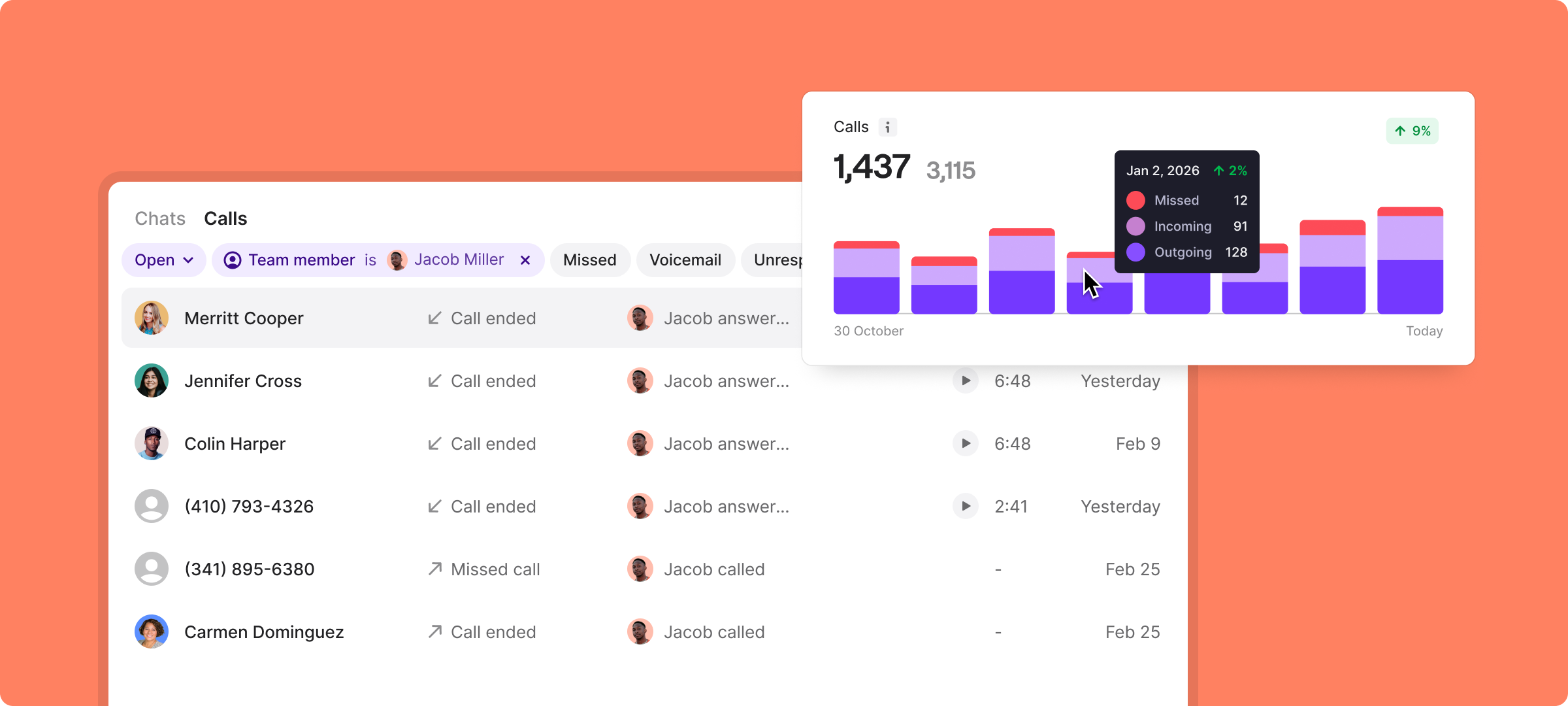
The filter is accessible from the Calls tab in any inbox. A single dropdown — 'Team member is [name]' — narrows the entire log to one agent's history, with tabs for Missed, Voicemail, and Unresponded calls visible alongside the full call list.
Reading the filtered call log
The call log filtered to Jacob Miller shows a chronological list of inbound and outbound calls with caller name, number, call type icon, duration, and timestamp. The log is dense but readable — each row contains enough context (missed/answered, duration in minutes and seconds, contact name) to make a quick judgment about whether a follow-up is needed.
Tabs at the top of the log — Missed, Voicemail, Unresponded — act as pre-built exception reports. The 'Unresponded' tab is particularly valuable: it surfaces callers who reached the agent but did not receive a reply call or message, regardless of whether the original contact was a missed call, voicemail, or unanswered text. This is a more complete picture of dropped conversations than a missed-call count alone.
'Unresponded' is the tab that matters most — it catches every dropped conversation, not just the obvious missed calls.
The overlapping calls chart
To the right of the call log, Quo renders an overlapping calls chart — a timeline visualization showing how many concurrent calls the team handled across the selected period. The chart visible in the interface shows three data series: Missed (12), Incoming (91), and Outgoing (128).
Overlapping calls are a signal of capacity strain. When two or more calls arrive within the same time window and the team cannot answer both, one becomes a missed call. The overlap chart makes this cause-and-effect relationship visual: spikes in the overlap series correlate with spikes in the missed series. Armed with this data, operations leads can make the case for an additional seat or a shift-overlap adjustment grounded in actual call-arrival data.
Use case: the weekly 1-on-1 review
The call log filter is designed for the kind of review that should happen weekly but often does not because pulling the data is too time-consuming. A manager opens Quo, applies the team-member filter, switches to the Unresponded tab, and has a focused list of conversations that need follow-up — all in under thirty seconds.
This is not a replacement for a coaching conversation; it is the preparation for one. Instead of a vague 'your call numbers seem low this week,' a manager can arrive at the review with specific examples: 'I noticed three callers last Tuesday who did not get a response after reaching voicemail — can you walk me through those?' That specificity makes the conversation productive rather than defensive.
Multi-color theme variants
Quo's interface is available in multiple visual themes — the call log is rendered in a dark charcoal variant in some screenshots and a deep purple variant in others. The underlying data and controls are identical; the color scheme is a preference setting. Both themes maintain the same information density and contrast ratios, making the interface comfortable for extended use in both light and dim environments.
Verdict
The call log with team-member filter is a tactical tool that pays for itself the first time a manager uses it to prepare for a performance conversation. The combination of chronological call history, exception tabs (Missed, Voicemail, Unresponded), and the overlapping calls capacity chart gives a complete picture of an individual agent's communication output — and the team's structural capacity to handle inbound volume.
For growing teams where call accountability is managed informally today, Quo's filtered log is the first step toward a structured, data-backed operations rhythm.
The filtered log is the first step toward a structured, data-backed operations rhythm — no spreadsheet required.